coachfed

For independent fitness coaches

Your clients, well fed. Your evenings, back.

Meal plans with real macros, workouts your clients log set by set, and an iPhone app that tells them what a gym machine is and how to use it. Your logo and colors inside it. Works alongside the tools you already use.

Start free

No credit card. Your clients download the app for free.

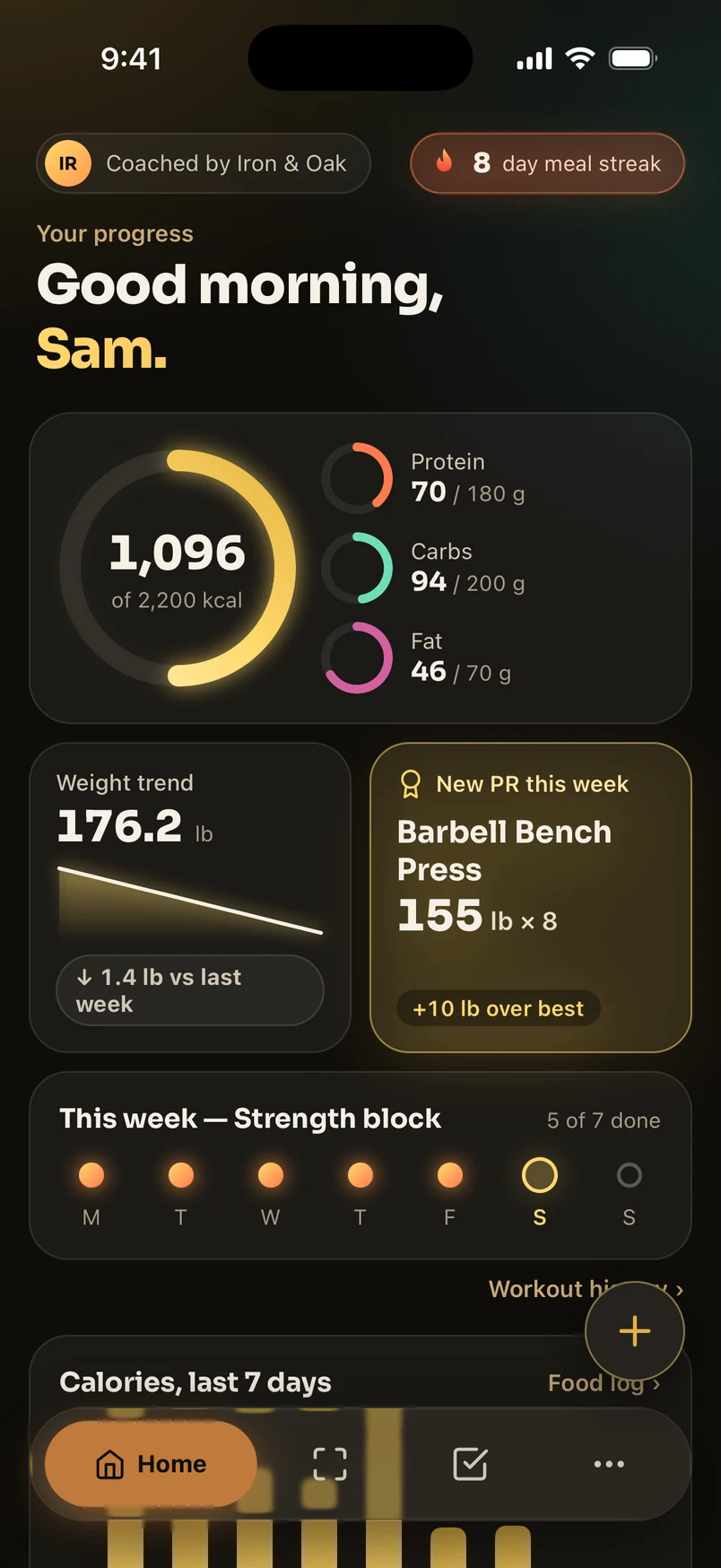
The Coachfed client app's Home screen, coached by Iron & Oak: an 8-day meal streak, a calorie ring at 1,096 of 2,200, protein, carbs and fat rings, a weight trend and a new bench press PR.
8 day meal streak

New PR.

160 lb × 8 on bench, past your best of 155 × 8.

Priya N.

days logged

How it fits

You stay the coach. We do the arithmetic.

Coachfed is the nutrition and client-experience layer. It works alongside TrueCoach, Trainerize or whatever you already use for the rest.

  1. Step 1

    You build

    Meal plans from a recipe library, with macros calculated from the recipes. Workouts from your exercises or a template. Built in your browser, sent in a click.

  2. Step 2

    They follow

    Your clients open the Coachfed iPhone app in your colors: today's meals and workout, a grocery list, and a scanner for the gym.

  3. Step 3

    You see it

    What they planned against what they actually logged, who is on a streak, and who needs a nudge. No spreadsheet, no screenshots in your texts.

Machine scanner

Any machine. Any gym.

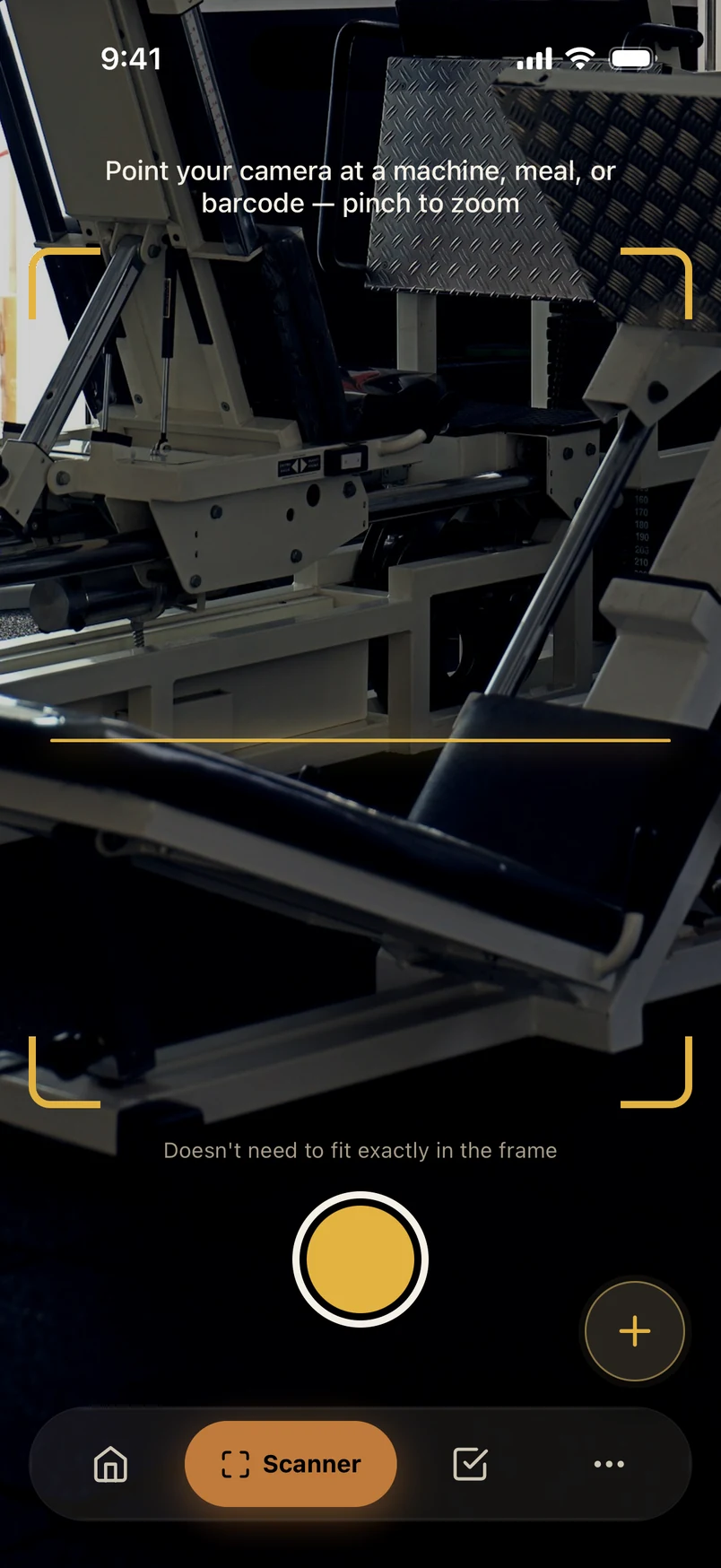
Your client points their phone at a machine and sees what it is and how to use it. It answers the 10pm “what’s this machine?” texts for you.

  • What it is

    The machine, matched against a curated catalog of gym equipment.

  • How to use it

    Setup steps, form cues and the common mistakes to avoid.

  • What to do next

    Log a lift on it right away, or see that it fits today's workout.

The same scanner logs a meal from a photo or a barcode. More on that below.

The Coachfed Scanner tab pointed at a leg press, with the gold viewfinder brackets around it.

Matched

Leg press

SetupForm cuesMistakes

Today, in their app

Planned vs. done.

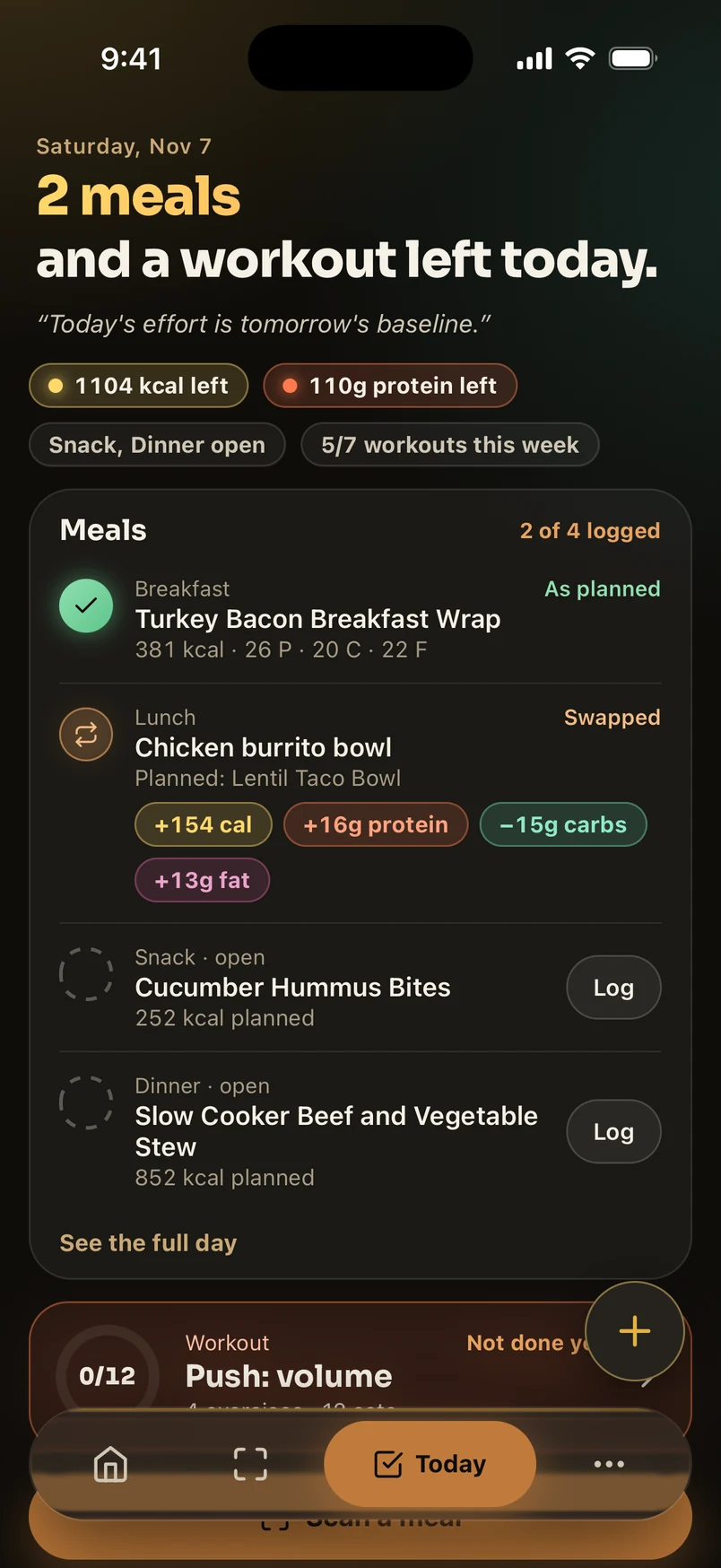
Every day, your client sees what you set and what they've logged against it. A meal eaten as planned, a meal swapped and the macro difference, what's still open.

  • The one line of guidance is arithmetic against your targets, like "1,104 kcal left". Never a food recommendation.
  • Your meal plan day by day, recipes and macros included, plus a grocery list built from the week.
  • Today's workout from the program you assigned, logged set by set.
The Today tab: 2 meals and a workout left. Breakfast as planned, lunch swapped for a chicken burrito bowl with its macro differences, snack and dinner still open, and the day's workout not done yet.

Saturday

2 meals left

Calories1,104 left
Protein110 left

Progress

Progress that feels alive.

Rings that fill as the day does, streaks worth protecting, and a moment when a lift beats their best. Consistency is easier to keep when it's visible.

  • Calorie and macro rings against the targets you set.
  • Meal and workout streaks, and a weekly view of the program.
  • A "New PR." banner mid-workout, and the latest PR on their Home screen.
  • Weight and strength trends, charted.

Today

8 day meal streak

Protein
70 / 180 g

Carbs
94 / 200 g

Fat
46 / 70 g

This week, strength block

5 of 7 done

New PR.

Barbell bench press, 160 lb × 8. Past the best of 155 × 8.

Food scanner

Snap a meal. Log it.

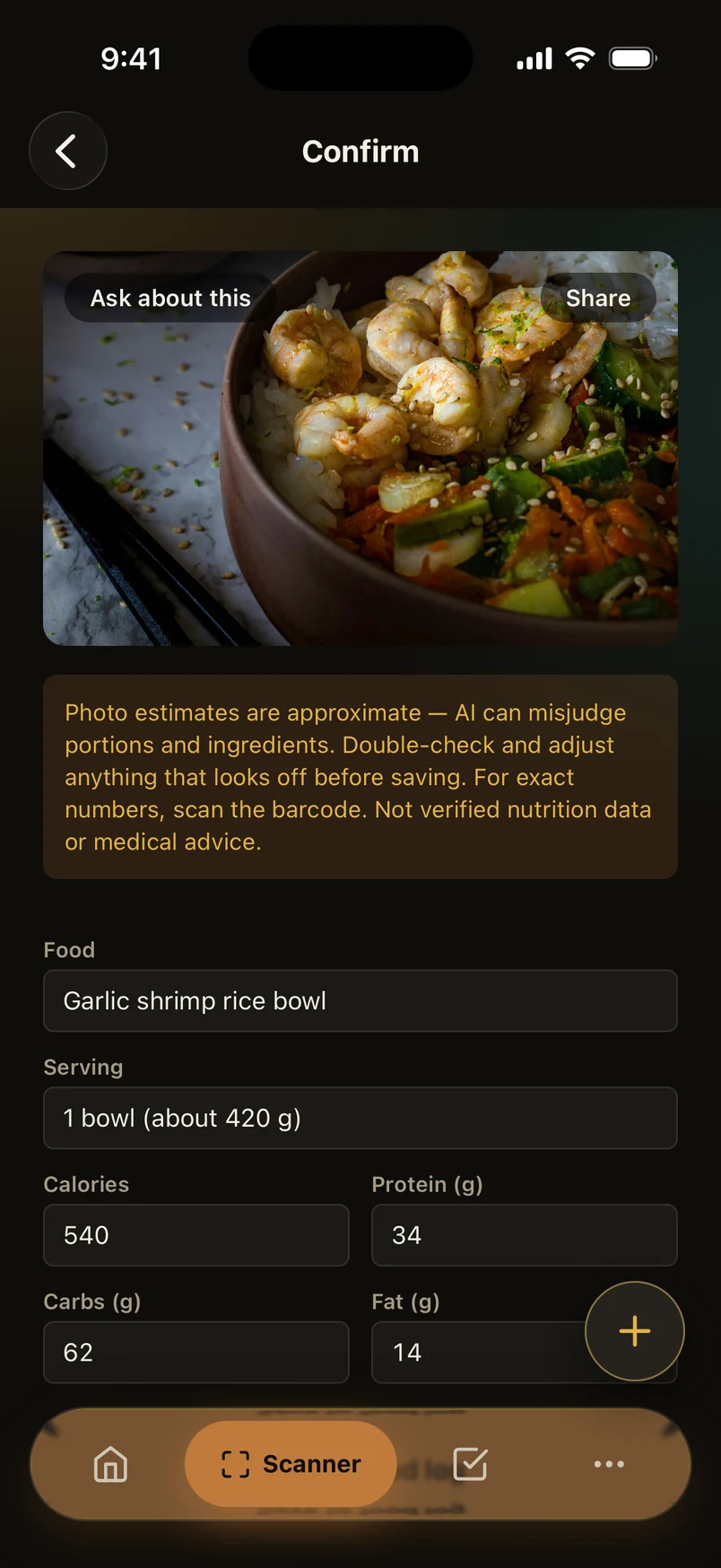
A photo of a meal gives an estimate of its calories and macros, and a barcode looks up the packaged food. Your client checks the numbers, edits anything that looks off, and saves.

Photo estimates are approximate. AI can misjudge portions and ingredients, so the app asks your client to check before saving. It is not verified nutrition data or medical advice.

Confirming a food photo: a garlic shrimp rice bowl estimated at 540 calories, 34 g protein, 62 g carbs and 14 g fat, under a banner that says photo estimates are approximate and should be checked before saving.

Estimate, check before saving

540 kcal

P 34 gC 62 gF 14 g

Your dashboard

Open it. See who needs you.

The web dashboard starts with what's waiting on you: a question to answer, a client who's gone quiet, a time to approve. Then every client's week at a glance.

Jump to…⌘K

3 things need you

  • Theo B. · asked a question about Wednesday's lunch

  • Luis O. · nothing logged in the last 7 days

  • Maya C. · requested Thursday at 6:00 pm

  • Sam R. · logged every day this week

Client adherence, last 7 days

  • Sam R.
  • Maya C.
  • Priya N.
  • Theo B.
  • Luis O.

Thu

2,164 kcal

P
101
C
150
F
89
On target
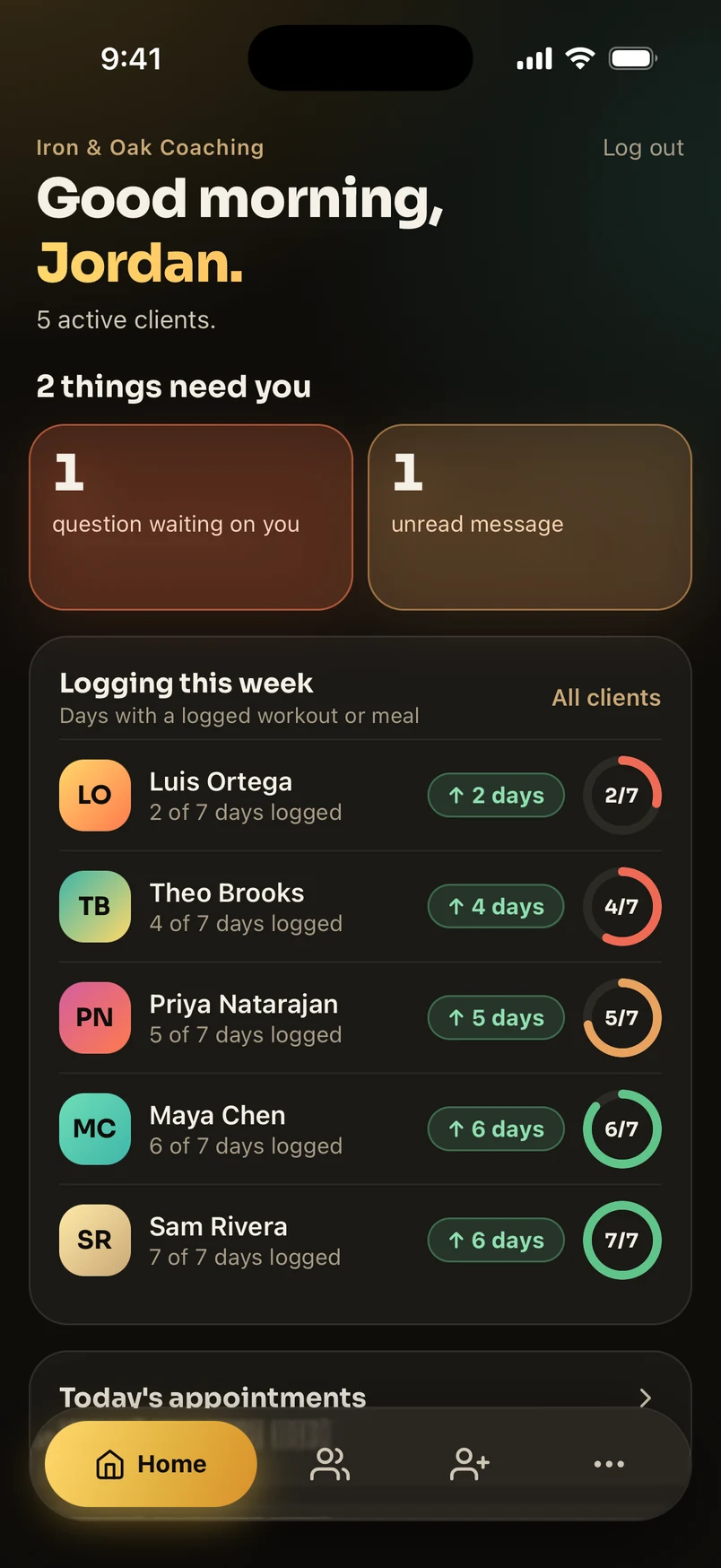
Coach mode in the Coachfed iPhone app: 2 things need you, and a ring for each client's days logged this week.

Coach mode, in the same iPhone app.

  • Needs your attention

    Unanswered questions, quiet clients, time requests and invites, in one list. The good news shows up too.

  • Adherence rings

    Days with a logged meal or workout, for every client, colored by how the week is going.

  • A plan builder with live macros

    Drag recipes into a week. Each day shows its calorie ring, macro bars and how far it is from target.

  • ⌘K to anything

    Jump to a client, a plan or a recipe from the keyboard. Press ? for every shortcut.

Between sessions

Closer to the whole week.

What happened between your sessions, in their words and their data, if they choose to share it.

Apple Health and Apple Watch

Your client can share their week with you.

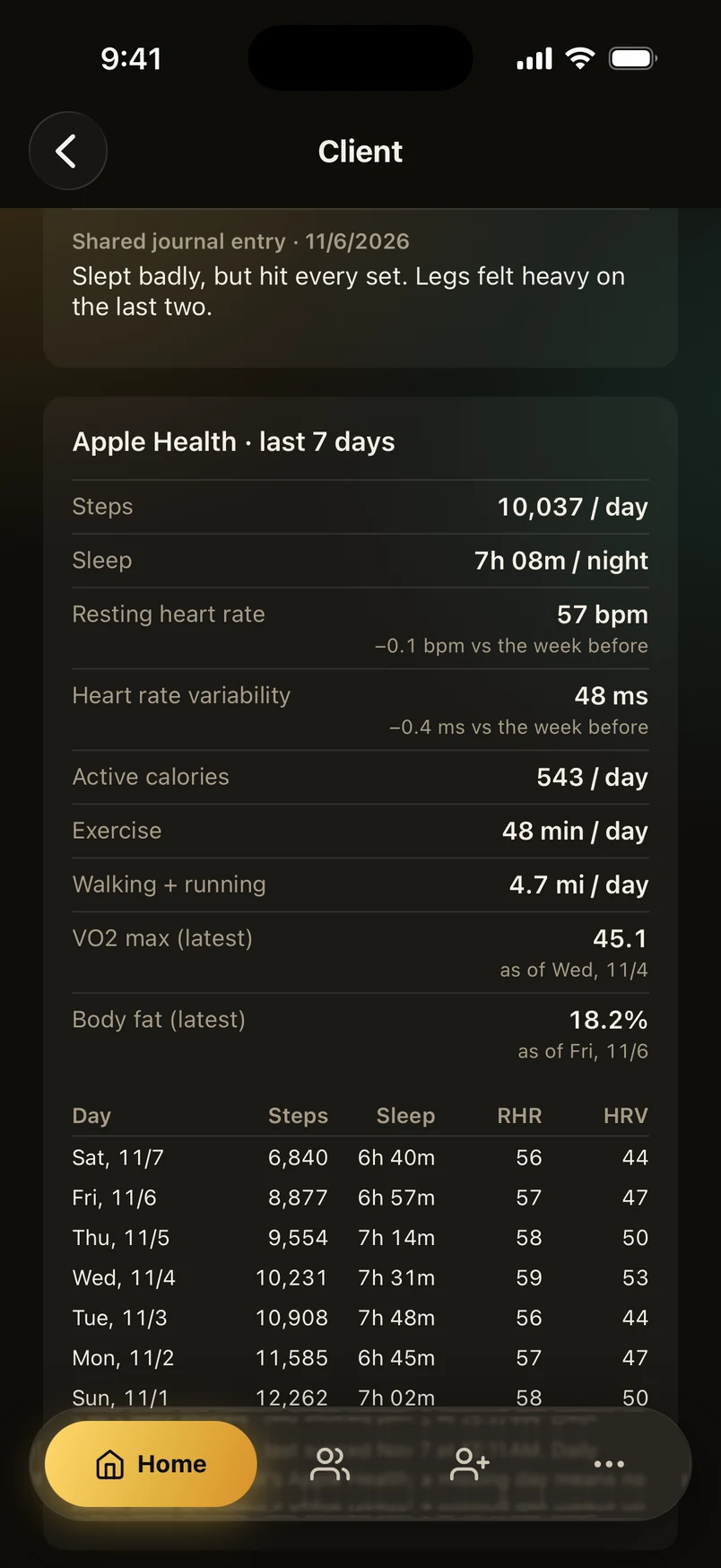
Optional, and off until your client turns it on. When they do, you see a daily summary (steps, sleep, resting heart rate, HRV and more) and every Apple Health workout, Apple Watch ones included. New workouts can sync in the background. If they turn it off, what they shared is deleted.

Steps
10,037 / day
Sleep
7h 08m / night
Resting heart rate
57 bpm
Exercise
48 min / day
A client's page in coach mode: their shared Apple Health summary for the last 7 days, with steps, sleep, resting heart rate, heart rate variability, active calories, exercise minutes, VO2 max and body fat.

Notes and questions

The 10pm thought, saved for you.

A private journal, entries they choose to share with you, and questions saved from any workout or meal plan for you to answer.

Should I add a set on bench now that 155 felt easy?

Waiting for your coach

Agreements

Signed before day one.

Write your coaching agreement once. Clients you invite read and sign it in the app before they start, and you can download each signed copy as a PDF.

Coaching agreement · signed by Sam Rivera

Everything else

One app, the whole week.

The scanner's the headline. Here's the rest of what ships with every plan.

  • Meal plans with real macros

    Built from a recipe library. Macros come from the recipes, never guessed.

  • Branded PDF exports

    Every plan as a printable PDF in your colors, with your logo.

  • Workout programming

    Build a program, or start from a template. Clients log it set by set.

  • Grocery lists

    Built from the week's meal plan, checked off in the aisle.

  • Equipment scanner

    Your client photographs what the gym actually has, picks a muscle group, and gets a routine that fits.

  • Programs for their goal

    Clients can start a 12-week fat loss plan, a split or an at-home program, built from real exercises. You see it with their workouts.

  • Scheduling

    Clients request a time, you approve it. Syncs with Google Calendar.

  • Messages

    Quick questions, sent and answered in the app.

  • Your brand in their app

    Your logo and colors inside the Coachfed app, applied the moment they sign in. Clients see you first.

“I got about six hours back most weeks. No more retyping macros between spreadsheets and texts.”
Jordan T., online coach, 30 clients

Pricing

One price. No add-ons.

We're not that kind of platform. Every tier gets the full product. Pricing scales with how many clients you bring, nothing else.

Solo

$29/month

Up to 15 clients

  • Meal plans, branded PDFs and grocery lists
  • Workout programming and progress tracking
  • Machine, food and equipment scanners for clients
  • Your logo and colors in the client app
Start free

most coaches start here

Growth

$59/month

Up to 50 clients

  • Meal plans, branded PDFs and grocery lists
  • Workout programming and progress tracking
  • Machine, food and equipment scanners for clients
  • Your logo and colors in the client app
Start free

Pro

$99/month

Unlimited clients

  • Meal plans, branded PDFs and grocery lists
  • Workout programming and progress tracking
  • Machine, food and equipment scanners for clients
  • Your logo and colors in the client app
Start free
“Clients think the scanner is magic. I think it's ten minutes back in my evening.”
Priya M., online coach
“Clients open the app and see my logo and my colors first. That mattered more than I expected.”
Dana K., strength coach
“It answers the 10pm 'what's this machine' texts so I don't have to.”
Sam O., online coach

Not working with a coach yet?

Start on your own. Find a coach when you’re ready.

Download the Coachfed iPhone app and try it free, no coach or card required. Whenever you want real guidance, tell us what you're working toward and a coach on Coachfed will follow up with you directly.

  • An AI meal plan built from real recipes
  • A program for your goal: 12-week fat loss, a split, at home
  • The gym-machine and food scanners
  • Free to start, no card required

Your clients, well fed.
Your evenings, back.

Set up your recipes, your branding and your first client tonight.

Start free

No credit card required.